Command line
| Command | What it does |
|---|---|
workflow-render export <file.json> -o <out.svg|out.png> [--scale N] [--theme light|dark] [--overlay <findings.json>] | Render a workflow or an execution to SVG or PNG, with a tool's findings drawn over it |
workflow-render view <file.json> [--port N] | Open the file in the browser viewer |
workflow-render --version | Print the version |
workflow-render --help | Print usage |
export
workflow-render export workflow.json -o workflow.svg
workflow-render export workflow.json -o workflow.png --scale 3
- The output format follows the file extension:
.svgor.png. --theme darkrenders n8n's dark canvas. The default islight.--scale Nsets the PNG size multiplier. The default is2. It is an error with an.svgoutput.- The SVG is self-contained. Icons are inlined and fonts are embedded, so it looks the same in a browser, an
<img>tag or a file preview. - The same input always produces the same SVG, byte for byte.
--overlay <file>draws a canvas overlay over the workflow: a ring and a count badge on each node a tool flagged.workflow-lint lint wf.json --format canvas-overlay > findings.jsonproduces one.- The root
<svg>carries a provenance stamp asdata-*attributes: the emulated n8n version (data-descriptions-version), the tool (data-tool-name,data-tool-version), a hash of the input (data-input-hash,sha256:+ 16 hex characters of the key-sorted JSON) and the workflow'sid,nameandversionIdwhen the export has them (data-workflow-id,data-workflow-name,data-workflow-version-id).meta.instanceId, credentials and webhook ids are never written. --redactrenders from a redacted copy: sticky-note text, node subtitles and the provenance stamp come from the masked data, and the overlay's texts are masked too.--mask,--keepand--keep-datawork as forredact. The report goes to stderr.
redact
workflow-render redact workflow.json -o workflow.public.json
workflow-render redact execution.json -o - --mask 'n8n\.mycompany\.com' > public.json
Writes a copy of a workflow or execution with what you would not publish masked in place as [redacted: <kind>], so the structure stays readable and the copy still renders. The input is never changed, and -o cannot be the input file.
| What | Masked as |
|---|---|
Credential references (credentials anywhere, including the copy of a node inside an execution's error): id and name. The credential type stays | credential |
Workflow id, versionId, meta.instanceId, webhookId, an execution's id and workflowId, and the people and projects in an API export (shared, homeProject, owner) | identifier |
The value of a field or header whose name contains password, secret, api key, token, authorization, cookie or private key (an expression that is only a reference, like ={{ $env.API_KEY }}, stays); the same names in text: query strings and form bodies (?api_key=…), connection strings (;Password=…;), .env lines, object literals, YAML and JSON text | secret field |
| Bearer and Basic credentials, JWTs, private-key blocks, AWS key ids, Stripe, OpenAI, Slack, GitHub, GitLab, Google and SendGrid key formats, wherever they appear; secrets in URL paths (Slack and Discord webhooks, Telegram bot tokens, any long path segment with a digit, such as a webhook id) | token |
| Email addresses | email |
The user:password@ part of a URL | url credentials |
| Pinned data and execution item values (keys and item counts stay) | data |
Anything matching --mask '<regex>' | custom |
--mask '<regex>'masks more.--keep '<regex>'protects the text it matches: other text in the same value is still masked, an email, token or URL credential is kept only if the pattern covers all of it (to keepada@example.com, write that address, not just the domain), and a secret field is left alone only when the pattern matches its whole value. Credentials, identifiers and item data are masked regardless. Both can be repeated, and both are your own regular expressions, so keep them simple.--keep-dataleaves pinned and execution item values in place; they are still scanned for the patterns above.-o -writes the JSON to stdout.- An array of workflows (
n8n export:workflow --all) or an API list ({ "data": [...] }) is redacted workflow by workflow. Anything else is scanned with the text patterns only, and the report says so.
It prints what it masked and the hosts still present in URLs:
masked 14 values in workflow.json
  credential      2  Store › credentials.postgres, Notify › credentials.slackApi
  identifier      4  id, versionId, …
  email           2  Format Reply › parameters.assignments.assignments[0].value, …
  data            1  pinData › Webhook
hosts kept: api.example.com, db.example.test
Masking is pattern-based, so read the report before you publish. It does not catch a person's name in free text, a phone number, a short secret in a field with an ordinary name, or your own n8n hostname: add --mask for anything the report shows you would rather hide. Node names are not masked, because connections refer to them.
Export every workflow in CI
for f in workflows/*.json; do
  npx workflow-render export "$f" -o "renders/$(basename "${f%.json}").png"
done
view
workflow-render view workflow.json
workflow-render view execution.json --port 4777
Expected output:
workflow-render viewing execution.json
  http://127.0.0.1:4777/
Press Ctrl+C to stop.
- The viewer binds to
127.0.0.1only. - Without
--port, it picks a free port.
Executions
Give view or export an execution instead of a workflow and the canvas shows the run.
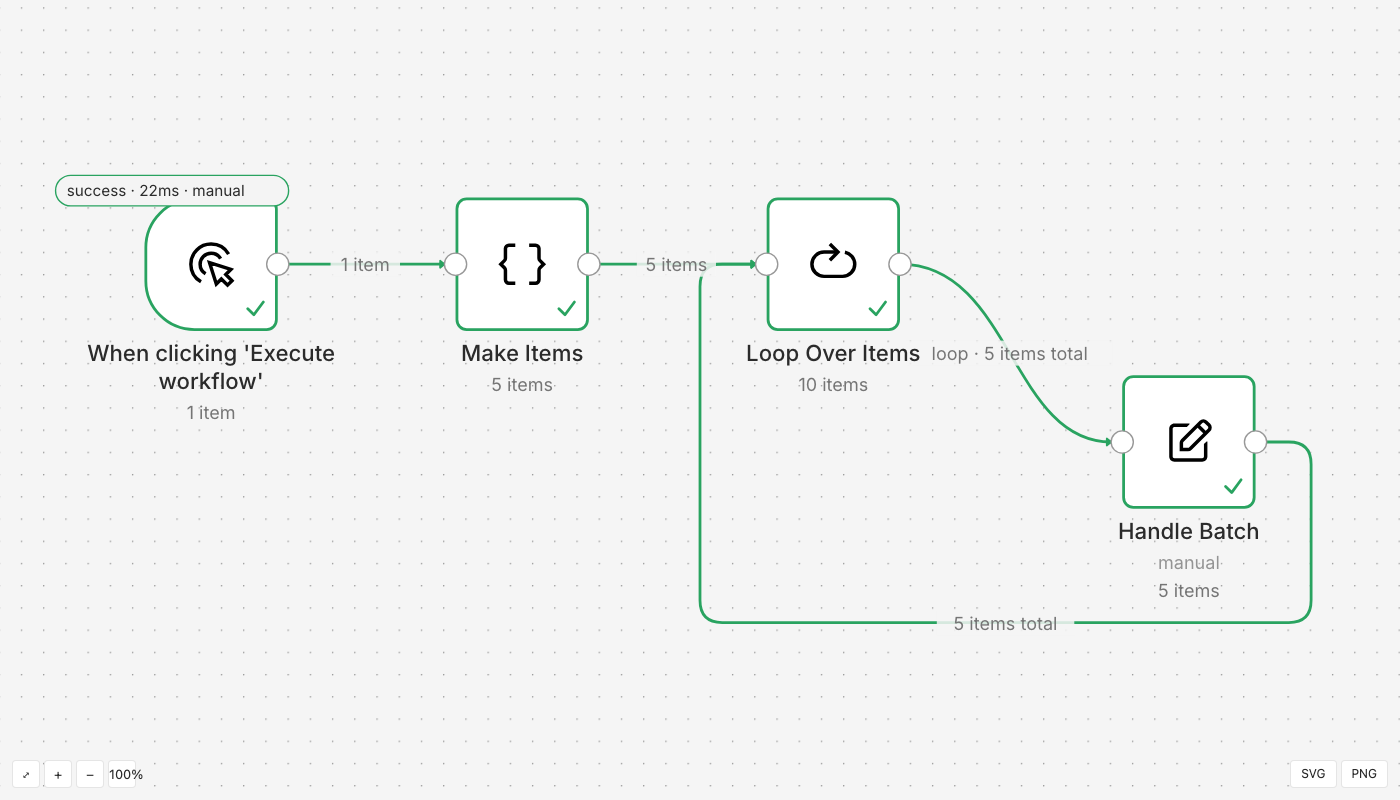
- Executed nodes take the status colour.
- Edge labels carry the item counts.
- Double-click a node to open the inspector: input, parameters and output, with Schema, Table and JSON views.
- A failed node shows its error and stack.
- Binary data is named, never fetched.
Exit codes and warnings
| Exit code | Meaning |
|---|---|
0 | The file was written, or the viewer stopped normally |
1 | The input could not be read, or is not a workflow or execution |
2 | Usage error, such as an unknown flag |
Warnings go to stderr, prefixed warning:. The file is still written.
workflow-render export dangling.json -o dangling.svg
Expected output:
wrote dangling.svg
warning: connection to unknown node "Ghost" dropped
Getting the JSON out of n8n
| What | How |
|---|---|
| A workflow | In the editor, open the … menu and choose Download, or call GET /api/v1/workflows/:id |
| An execution | Save the response of GET /api/v1/executions/:id?includeData=true |